Tag: pharmacy benefit managers

When Your Insurance Company Suggests Medical Impossibilities

Disclaimers

  • The following post is based entirely on my personal experience navigating the DC Government CareFirst BluePreferred PPO Plan and its Pharmacy Benefit Manager, CVS Caremark.
  • I am a healthcare professional and a patient, not an attorney or an insurance broker. This is NOT legal or financial advice. While I make no guarantees about the results of using these methods, my goal is to share my knowledge, documentation strategies, and experiences so you can better advocate for your own health.
  • This post is a direct follow-up to my previous guide on auditing your Explanation of Benefits (EOBs).
  • Any information from conversations with CVS Caremark or CareFirst comes from my notes taken during the calls in my ‘patient’s log’ as described in my blog. These notes were taken contemporaneously to ensure an accurate, time-stamped record of the instructions provided to me. All references to contractual rights are drawn directly from the governing CareFirst Blue Preferred PPO Evidence of Coverage Document.
  • Specific to the Certificate of Coverage (Evidence of Coverage), a CareFirst employee provided it to me when I was unable to obtain a copy from DCHR. If there is mismatch between the version I have and the version with DCHR, well that’s for another post. (Stay tuned.)
  • Please note: I currently have a formal grievance regarding this matter under active review with the District of Columbia Department of Insurance, Securities & Banking (DISB; DCID#: 2065134). I have also contacted the DC City Council and Mayor’s office. All regulatory violations discussed below are alleged based on my documentation, and I will provide an update once I receive a final disposition.

The Tech Black Hole: Where Prior Authorizations Go To Die

If your doctor tells you they are waiting on your insurance, and your insurance tells you they are waiting on your doctor, someone is lying. Actually, it’s probably the software.

I tracked a pattern across five medical specialties (including neurology, gastroenterology, rheumatology, and my PCP). Providers were submitting prior authorizations through a vendor portal called CoverMyMeds. The system would tell the pharmacy the request was “sent,” but the providers never received the questionnaires. After 48 to 72 hours, the system automatically closed the files for “no response”.

This is a de facto denial of benefits without clinical review, likely caused by a software defect. I realized something was off in December 2025 when I was still with Aetna, but I thought it might just be the facility.

When providers had the same trouble in January 2026 with the same result, I realized that didn’t fit. It seemed more “systemic”, and the only commonality across these situations was that the prior authorizations were being submitted through CoverMyMeds. When speaking with a CVS Caremark Sr Rep in February, I was told that providers and patients had been expressing the same frustration I just noted. Additionally, you can see more here in the reviews.

(DISCLAIMER: This is an observation based on a pattern of incomplete PAs for the same reasons and the reactions of providers who all indicated the same issue: They never received requests for the information.)

Clinical Absurdity and Medical Impossibility

What do you do when a senior representative at your Pharmacy Benefit Manager (PBM) suggests you ask your provider to give a 30-day prescription for a 90-day quantity of a medication?

I’ve been taking the same dose of a brand-name maintenance medication for over 20 years. Recently, my PBM, CVS Caremark, approved my brand medically necessary PA (2/27/2026) but restricted the system to only dispense a 34-day supply. (This changed to 30-days less than 12 days later.)

What followed was a masterclass in administrative gaslighting:

  • Excuse 1: First, they told me I just needed my provider to file a ‘maintenance exception’.
  • Excuse 2: Then, they told my provider that an exception didn’t actually exist. When I called CVS Caremark, a Senior Representative blamed the manufacturer, claiming they restrict the medication to 30 days. I addressed this odd statement as there is nothing on the manufacture’s website or the web indicating the recommendation was accurate*.
    • The “Solution”: Finally, the Senior Representative spoke with the Prior Authorization team again. Their solution? Have my provider submit a prescription for 180 Celebrex 200 mg capsules to be taken over 30 days.

* Note. That is 6 pills a day of a medication where the FDA safe limit is two. Also, while on hold on that date, I emailed the manufacturer, Viatris, and received the response below:
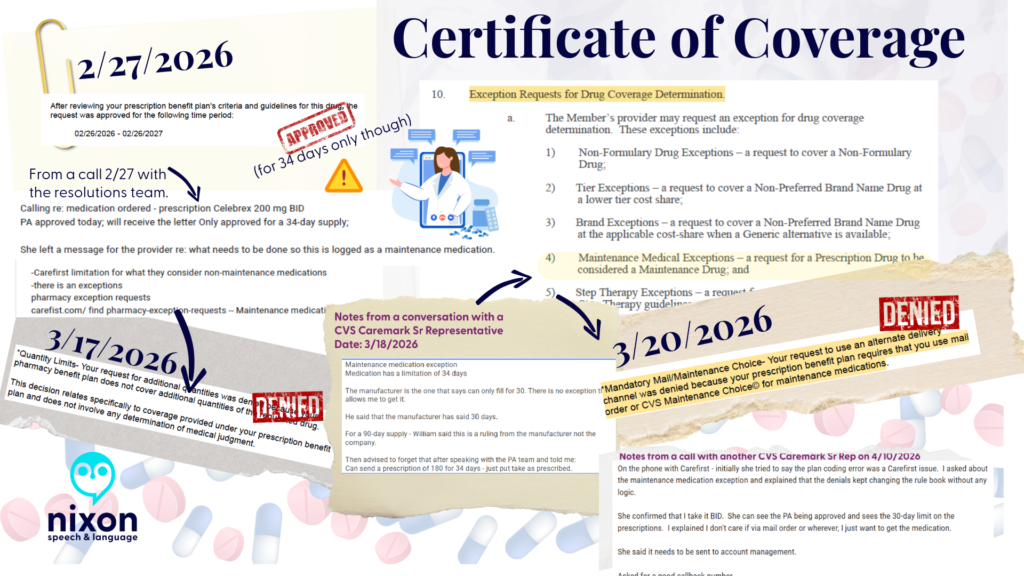
The hurdles of navigating PBM decisions that do not match plan documents. Images include screenshots of my CareFirst Blue Preferred PPO Evidence of Coverage.  This includes screenshots of conversation notes and denials of maintenance medication PA requests.
Screenshots in this image are from:
-CareFirst BluePreferred PPO Certificate of Coverage (Plan Sponsor: Government of the District of Columbia) (Obtained via CareFirst)
-Responses to medication PA requests from CVS Caremark
-Notes from my conversations with representatives at CVS Caremark
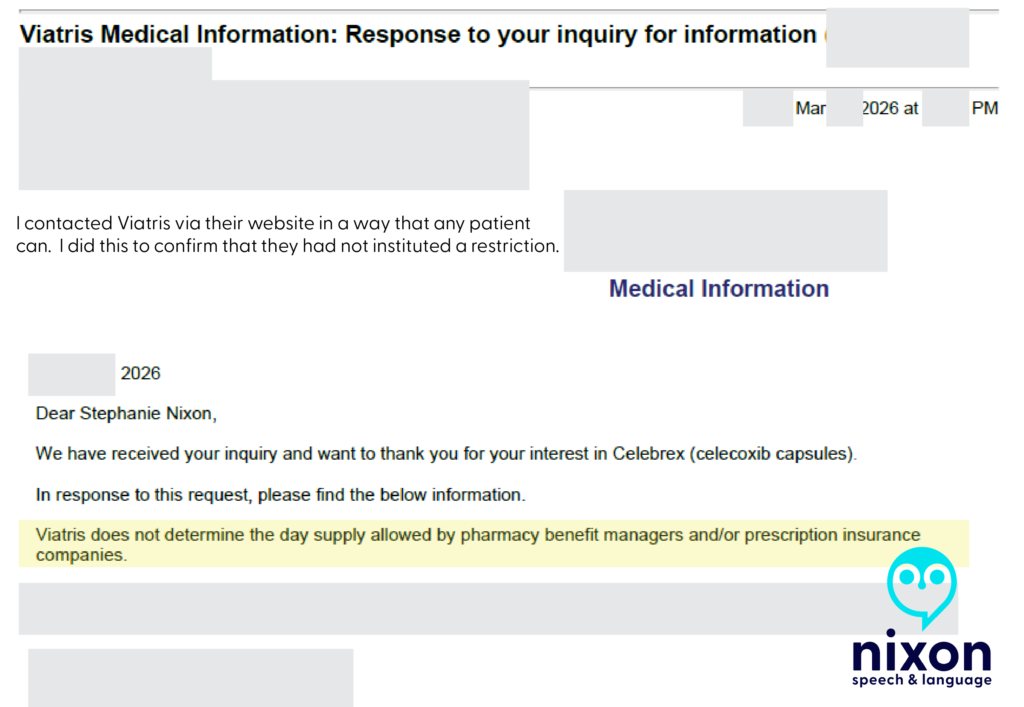
Message with Viatris
I contacted Viatris directly to confirm they had not changed their prescription recommendations.

I was stunned. I pointed out that this sounded like “creative pharmaceutical benefits”—otherwise known as insurance fraud. The representative laughed.

I didn’t know what to say as I got off the phone.

I spoke with my amazing Health Advocate and PCP, and then dug into my hundred-page policy myself. 

I found Section 10(a)(4), which explicitly allows a medication like mine to be classified under a “Maintenance Medical Exception” for a 90-day fill. So I’m unsure what rules the senior representative was looking at, but they definitely did not match the rulebook the CVS Caremark Resolutions Specialist saw on 2/27/2026.

So, I filed a complaint with DISB

DISB is the District of Columbia Department of Insurance, Securities, and Banking.
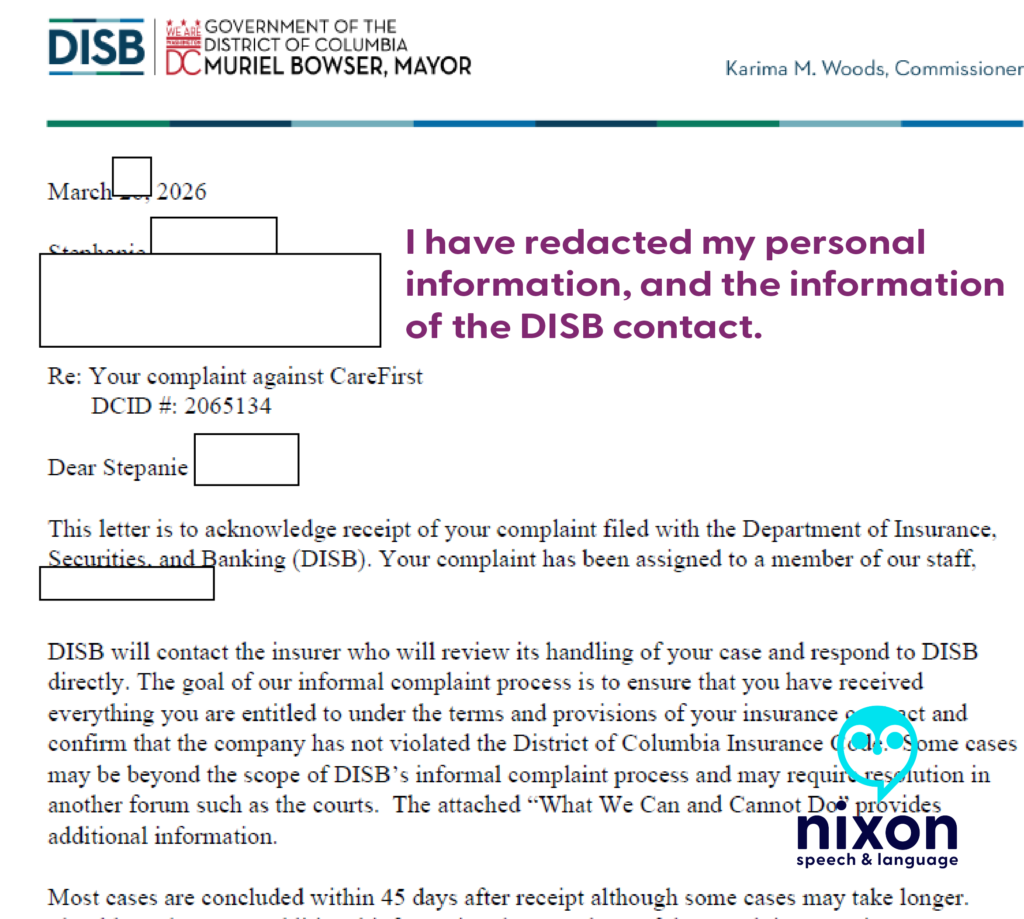
Acknowledgement from DISB
Note. CVS Caremark was mentioned as the PBM also responsible in the filing. Because CareFirst writes the “rules” I put them as the primary group in the complaint.

Since that date, I have contacted DC City Council and Mayor Muriel Bowser via email. There are more issues than just the above, but I will explain how I did this in another post.

As of 4/10/2026

After an almost 1-hour call with CVS Caremark on 4/10/2026, a Senior Representative informed me that she could see the maintenance medication exception in my plan documents. At the end of the call, she said that the issue needed to be sent to “account management” and that such issues are often corrected after 5 business days.

I have not heard anything as of 4/18/2026.

The Patient’s Playbook: Protect Yourself

Insurance companies rely on your exhaustion. You must document everything and demand your legal rights.

  • Track Every Call: Stop scribbling on scrap paper. Use the free Google Form I created—my “Patient’s Log”—to track the date, time, representative name, and action items of every call. Evidence is the only thing that wins appeals.
  • Check Your EOBs: If you are on a PPO and see a sudden deductible applied to standard pharmacy claims, call your insurer, demand an “Accumulator Adjustment,” and report a “Plan Design Error.”

Never take a verbal denial at face value. You must read the actual rules in your Certificate of Coverage (COC) to catch their lies—just like a Resolutions Specialist pointed out the ‘Maintenance Medical Exception’ in my contract leading me to push a Senior Representative at CareFirst about the frustration I had actually…getting one. (i.e., I couldn’t.)

The Golden Rule: Get Your Certificate of Coverage (COC)

Patients and Providers: Never take a verbal denial at face value. Demand the policy in writing, contact the manufacturer if they are blamed, and report “creative pharmaceutical benefits” to your state insurance administration immediately 

To do this, you must get a copy of your Certificate of Coverage (COC). This is the governing rulebook—usually over 100 pages—not the short “Summary of Benefits.”

Under federal disclosure standards (specifically ERISA), if you submit a written request to your plan administrator for your governing plan documents, they are legally required to provide them to you within 30 days. Failure to comply with this federal disclosure window can carry potential statutory penalties of up to $110 per day.

Stay tuned—because simply obtaining my COC from the DC Government (DCHR) has been an entirely separate battle. I have a copy, but not via DCHR, despite repeated requests.

🗣️ Please share this post and tag @MayorBowser, @CMCHenderson, and the DC City Council Committee on Business and Economic Development. We need proactive DISB market conduct audits, not just individual complaint responses.

Trademarks and Fair Use Notice: All company names, logos, and trademarks—including CareFirst BlueCross BlueShield, CVS Caremark, Viatris, and any brand-name prescription drugs (such as Celebrex)—are the property of their respective owners. Their inclusion in this post and associated images is for educational, informational, and advocacy purposes only and does not imply any affiliation or endorsement.

Copyright © 2026 Nixon Speech and Language, All Rights Reserved.

Access and advocacy chronic illness claims processing clinical documentation bias communication log deductible Department of Education doge Dyslexia education errors processing claims gmail google workspace Guava Health Health apps healthcare communication disparities health insurance health insurance appeals health insurance benefits health insurance mistakes Independent Funding innovation Institute of Education Sciences invisible illness Kanban Task Tracker learning disabilities managing your health max out of pocket medical gaslighting examples medical record transparency more than labs National Institutes of Health neurodivergence NIH Organizer patient advocacy in healthcare Perplexity Health AI petition pharmacy benefit managers Planner Research Funding speech-language pathology Spoonie life subjective vs. objective medical notes Systematic Research

Access and advocacy, health insurance, health insurance mistakes, pharmacy benefit managers

Don’t Lose Track of Health Insurance Calls: A free tool for patients and families

Father and his children at the table

Have you ever spent hours on a call with a provider or insurance company and then when you call back you’re told they have no record of the call? If so, you know how exhausting self-advocacy can be.

Managing healthcare for yourself or your family shouldn’t require a law degree, but keeping a detailed “paper trail” is one of the most important things you can do when disputing a bill, fighting for a prior authorization, or coordinating care.

As a patient and provider, I know that advocating for care and coverage is hard enough. So I am sharing a tool I made for me and my husband in January 2026: A Healthcare and Insurance Communication Log. (See my last post for more information.)

This tool was made primarily for dealing with health insurance (including our pharmacy benefit manager).

What is it?

A simple, customizable Google Form that you can fill out on your phone or computer during or immediately after a phone call. Use it to track:

  • Date and time of the conversation
  • Who you spoke to
  • What you discussed
  • What your next steps (and their next steps) are
  • And more…

You can quickly reference the key information needed from previous calls by looking at the entries in the form: (e.g., name of who you spoke with, company they are with, and date/time of the last communication, what was said, etc.).

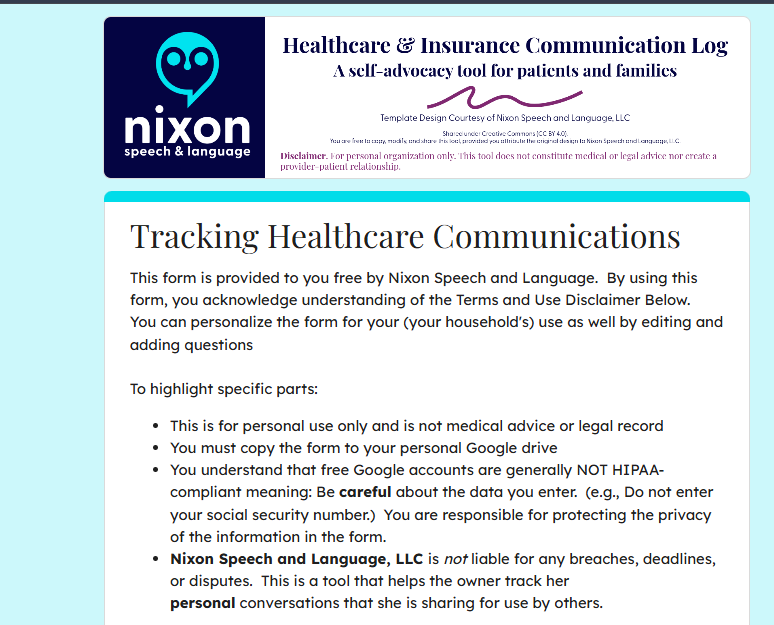
The form

A Quick Word on Privacy: Share the Tool, Not Your Data

If you find this call log helpful, we absolutely want you to share it with your friends, neighbors, or online support groups! However, it is crucial that you share the tool safely.

Because your copied Google Form is tied directly to your personal Google account and your private spreadsheet, sharing your specific form link outside of your immediate family (more specifically those involved in your healthcare and health insurance decisions).

If you send someone your personal link to copy for their own use, you will accidentally give them access to your Protected Health Information (PHI) and private medical notes.

The safe way to share:

The safe way to share: If you want to recommend this tool to someone else, do not share your Google Form link. Instead, simply copy the web address (URL) of this blog post and send that to them! This ensures they can read the instructions and download their own clean, private template that is completely separate from your data.

Disclaimer:

The Short Version: (Simply put)

  • This is just a helpful tool: This tracker is a free organizational aid, not official medical or legal advice, and downloading it does not make you a patient of Nixon Speech and Language.
  • This tool does not set reminders for you.
  • You are in charge of your data: The information you type goes straight into your personal Google account, not ours. You are responsible for keeping your own account and passwords secure.
  • Be mindful of privacy: Free Google accounts are not strictly protected by HIPAA (healthcare privacy laws). Please be careful about typing highly sensitive information (like Social Security numbers) into the form, and make sure you track strict insurance deadlines on your main calendar, too.
  • Share the tool, not your data. Share the link to the blog to help your friends, not your own form.

Longer version

Please read before downloading: This form is a self-help organizational tool provided courtesy of Nixon Speech and Language, LLC. It is not a medical device, a legal record, and does not constitute professional medical or legal advice, nor does it establish a provider-patient relationship. Do not rely solely on this form for critical deadlines. By downloading this template, you acknowledge that you are the sole owner of the data entered and assume all responsibility for securing your personal Google account. Standard, free Google accounts are generally not HIPAA-compliant environments, so please exercise caution when entering highly sensitive Protected Health Information (PHI).

By downloading this template, you acknowledge that you are the sole owner of the data entered and assume all responsibility for securing your personal Google account. Standard, free Google accounts are generally not HIPAA-compliant environments, so please exercise caution when entering highly sensitive Protected Health Information (PHI).

How to set it up

  • Make your copy: Click the link at the bottom of this post and select “Make a copy.”
  • Customize your form: Open your new form and edit the placeholder text.
    • Change the “Who was the call about?” question to list your specific family members.
    • Update the “Which organization did you contact?” question to list your main contacts (e.g., Blue Cross, Aetna, CVS Caremark).
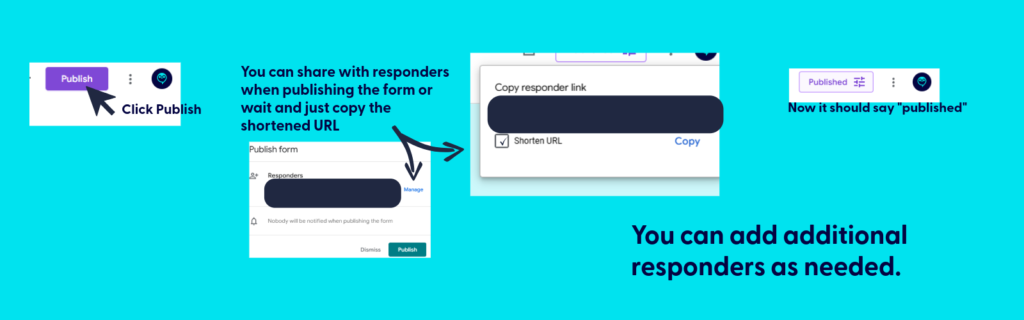
  • Publish the form. Be sure to copy the link after publishing for your use.
  • Save it for easy access:
    • Fillable form: Bookmark the link to your fillable form on your computer (in Google Drive), or save it to your phone’s home screen so you can have it ready to complete during your next call.
    • Bookmark the file used to create the fillable form: This is where you’ll find all your call logs. You can print (or PDF) specific responses or export all responses to sheets.
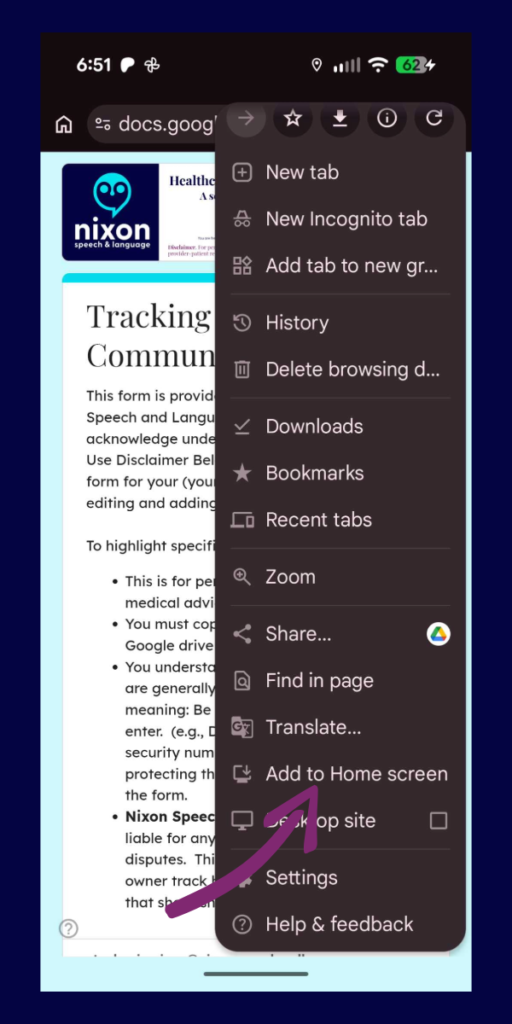
Make the fillable form an app on your phone
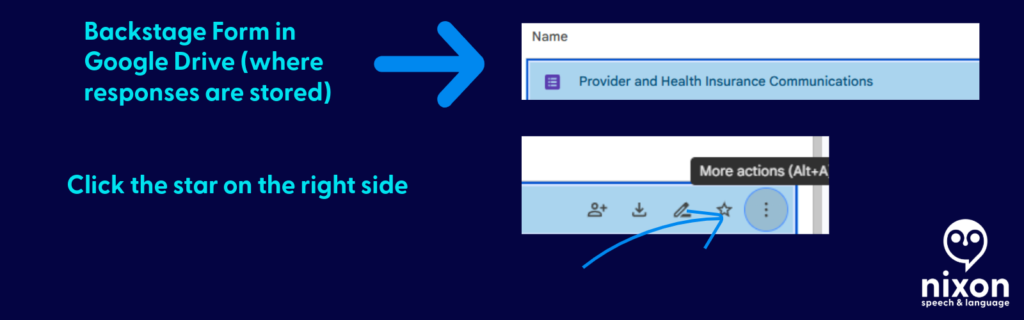
Star the backstage form in Google Drive so you can review responses during calls.
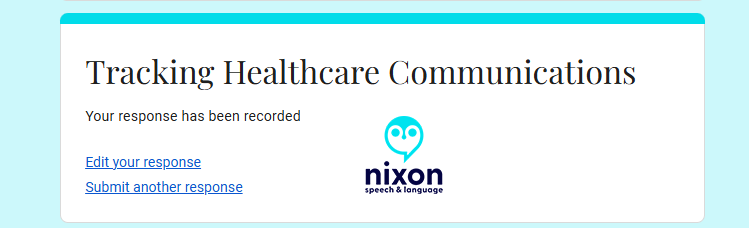
  • Be sure to hit submit when you finish the call. If you don’t, your call log won’t save.

💡 Pro-Tip: Make it a Household Effort!

If you share healthcare duties with a spouse, partner, or adult child, you can use this single form to track everyone’s calls in one central place!

Once you have copied the form to your Google Drive and customized your family’s names, simply click the purple “Send” button at the top right of the screen. You can email the link directly to your partner, or copy the link and text it to them.

Have them save that link to their phone’s home screen. Now, whether it’s you calling the PBM about a prescription or your spouse calling the provider about a bill, all of your notes will feed into the exact same spreadsheet. No more asking, “Wait, what did the insurance rep tell you yesterday?”

The following applies only to those you want to share access to protected health information: If they need to be able to reference all calls for your household/family, be sure to share the backstage link AND fillable form.

📱 Make It an “App” on Your Phone

The easiest way to use this log is to save it directly to your phone’s home screen. That way, you don’t have to dig through your Google Drive every time you make a call.

First, get your fillable link: Open your form on your computer, click the purple “Send” button at the top right, click the link icon (the little chain), and copy that link. Email or text that link to your phone, then follow these steps:

For iPhone (Safari):

  1. Open the link on your phone using the Safari browser.
  2. Tap the Share icon at the very bottom of the screen (it looks like a square with an arrow pointing up).
  3. Scroll down the menu and tap Add to Home Screen.
  4. Type a short name for it (like “Insurance Log”) and tap Add in the top right corner.

For Android (Chrome):

  1. Open the link on your phone using the Google Chrome browser.
  2. Tap the Menu icon in the top right corner (the three vertical dots).
  3. Scroll down and tap Add to Home screen.
  4. Type a short name for it (like “Insurance Log”) and tap Add.

Now you will have a shiny new icon on your phone right next to your other apps. Just tap it whenever you are on a call!

📂 How to View Your Call History (The form and spreadsheet)

Think of your Google Form like a restaurant. The shortcut you saved to your phone is the “Front Door”—it’s just the menu where you place your new order. To see the history of every call you have ever logged, you have to go “Backstage” into your Google Drive.

Here is how to find your notes:

  1. Go to your Google Drive: On a computer, go to drive.google.com and log in with the exact same Google account you used to copy the template.
  2. Open the “Backstage” File: Find your saved form (e.g., “Healthcare Communication Log”) and double-click to open it. This opens the Editor view.
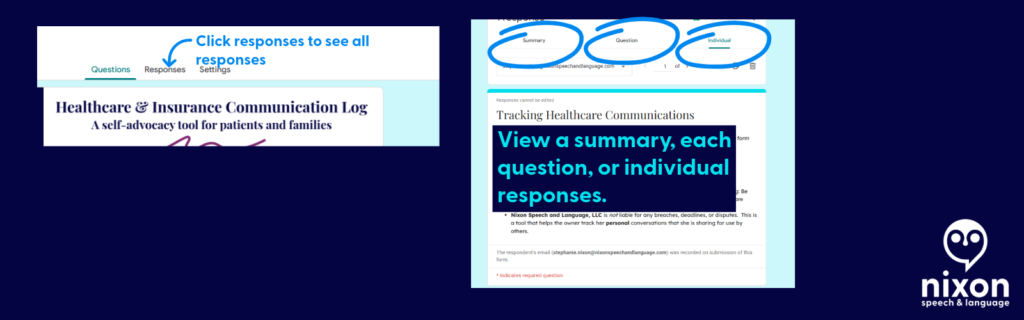
  3. Click the Responses Tab: At the very top center of the screen, click the word Responses (it is right next to “Questions”).
  4. Create Your Master Spreadsheet: For the best view, look for the little green icon that says “Link to Sheets” (or “View in Sheets”) near the top right of the Responses section.

Clicking that green button will instantly generate a clean, organized Google Spreadsheet containing every single detail of every call you have ever submitted.

Move all the data to Google Sheets
You can see all responses as well by clicking responses at the top.

📄 Need Hard Proof? How to Save a Call as a PDF

If you are filing a formal appeal or need to prove exactly how many times you contacted your insurance company about a specific issue, you can export individual call logs as clean, printable PDF documents.

Here is how to do it:

  1. Go “Backstage” into your form and click the Responses tab.
  2. Instead of looking at the spreadsheet, click the Individual tab (located right next to “Summary” and “Question”).
  3. You will see your form filled out exactly as you submitted it. Use the < and > arrows to flip through your history until you find the specific call you need.
  4. Click the Printer icon at the top right corner of that specific response.
  5. When your computer’s print menu pops up, change the “Destination” or “Printer” from your physical home printer to Save as PDF.

Now you have a professional, timestamped document you can attach directly to an appeal letter or an email to your provider!

PDF an entry

Get the template

Ready to get organized? Click below to copy the template to your Google Drive:

Please read before downloading: This form is a self-help organizational tool provided courtesy of Nixon Speech and Language, LLC. It is not a medical device, a legal record, and does not constitute professional medical or legal advice, nor does it establish a provider-patient relationship. Do not rely solely on this form for critical deadlines. By downloading this template, you acknowledge that you are the sole owner of the data entered and assume all responsibility for securing your personal Google account. Standard, free Google accounts are generally not HIPAA-compliant environments, so please exercise caution when entering highly sensitive Protected Health Information (PHI).

By downloading this template, you acknowledge that you are the sole owner of the data entered and assume all responsibility for securing your personal Google account. Standard, free Google accounts are generally not HIPAA-compliant environments, so please exercise caution when entering highly sensitive Protected Health Information (PHI).

Remember, share the post, not your data.

By clicking here you acknowledge that you have reviewed the disclaimer.

Information provided in this post by, Stephanie M. Nixon, Ph.D., CCC-SLP, is provided in good faith. Nixon Speech and Language, LLC makes no representation or warranty of any kind, express or implied regarding the accuracy, adequacy, validity, reliability, availability, or completeness of any information.

Access and advocacy, claims processing, health insurance, health insurance appeals, health insurance benefits, health insurance mistakes, managing your health, pharmacy benefit managers
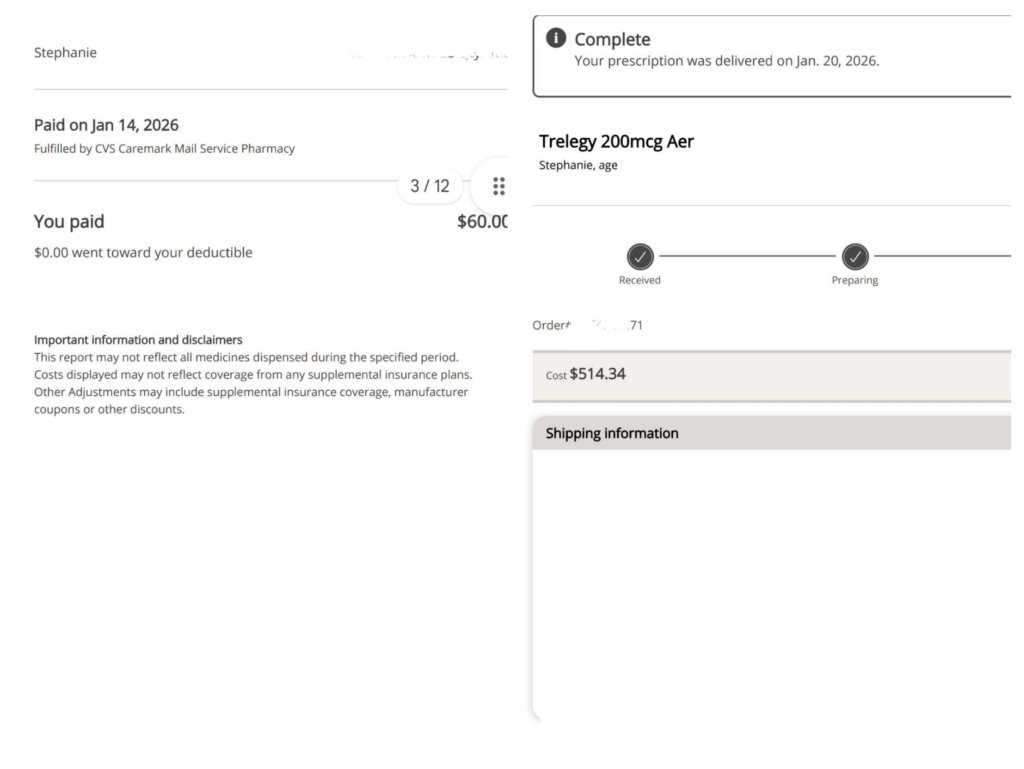
When $60 Becomes $800: How to Catch (and Fix) Health Insurance Errors

A real-life lesson in why you must audit your Explanation of Benefits.

We often assume that when the pharmacist rings up a total, or when a medical bill arrives in the mail, the number is correct. We assume the insurance computer “knows” our plan.

But we also know that the insurance computer (and even the claims processors) have a history of applying the plan incorrectly (or inconsistently).

In January I had accepted that the “computer” knew our new plan for our prescriptions —and it nearly cost my family over $1,300 in a single month.

Image created by Nixon Speech and Language, LLC using Adobe Firefly AI.

From Advocate to Patient

For years, I essentially worked two jobs. By day, I was a Speech-Language Pathologist working full-time. By night, I often spent three hours at a time, multiple nights a week, on the phone with insurance companies fighting for my own coverage. I learned early on that whether you are an educator advocating for a student, provider advocating for a patient, or a patient advocating for yourself, the system will often default to “No” unless you prove otherwise.

Now, living with chronic illness and on long-term disability, I no longer have that kind of energy to spare. My “work” today is largely just managing my own health. So when a computer glitch recently caused our pharmacy bills to skyrocket, it wasn’t just a financial error—it was a drain on the limited energy I have to survive.

I’m sharing this story not just as a professional who knows the paperwork, but as a patient who knows the exhaustion. I want to help you catch these errors quickly so you don’t have to spend your evenings fighting for the coverage you’ve already paid for.


The “Glitch”: When the Math Doesn’t Math

The “Glitch”: When the Math Doesn’t Math The situation started simply enough: My husband went to pick up a routine prescription. Instead of his usual $60 copay, he was charged $807.

The explanation from the pharmacy? “You haven’t met your deductible yet.”

That sounded plausible. It was January, the start of a new plan year. But when I logged into my portal, I saw something even stranger.

I had paid over $1,000 for medications in January, but my Deductible Met” counter was sitting at $0.

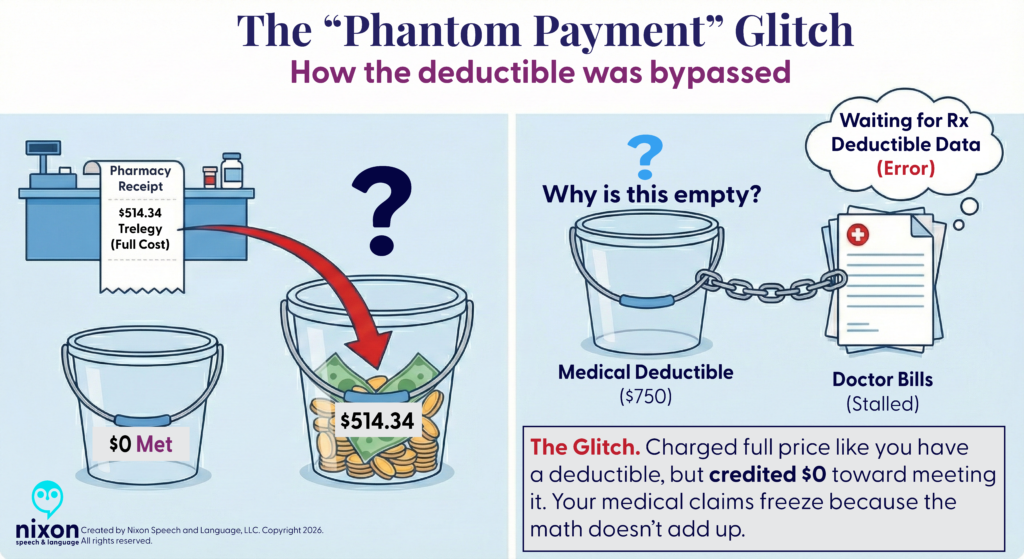
Where did the money go? The system had bypassed the deductible entirely and applied the cash directly to my “Max Out-of-Pocket” limit.

  • The Error: They were charging me full price (as if I had a deductible), but refusing to credit my deductible bucket.
  • The Result: I was on track to pay thousands of dollars out-of-pocket without ever technically “meeting” my deductible. It was a phantom charge that left me with the worst of both worlds: high costs and no progress toward my coverage limits.
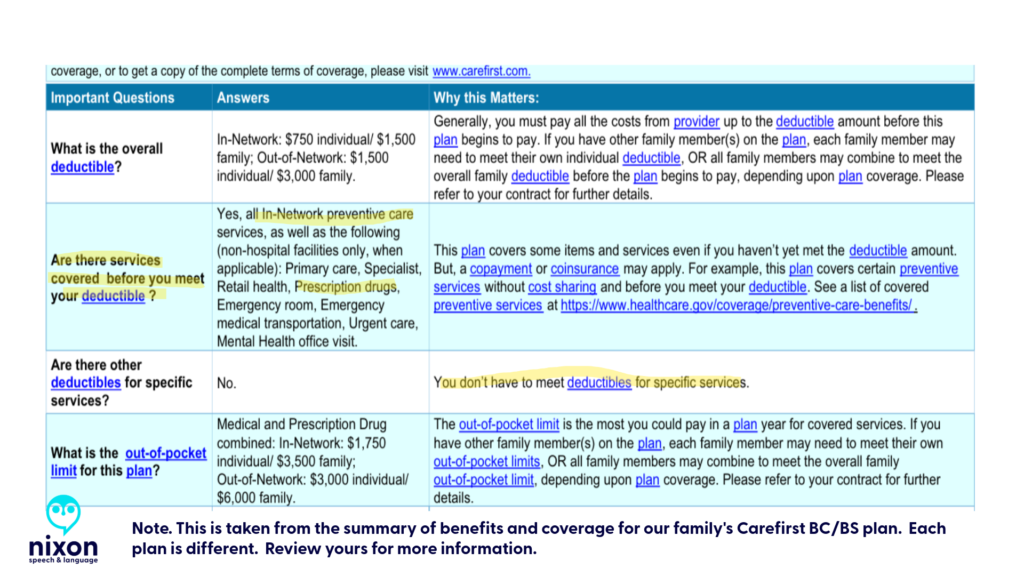
This is what an error looks like. My plan has a $0 pharmacy deductible, yet the system charged me over $500.

The Domino Effect: Why You Can’t Just “Let It Slide”

You might be tempted to just pay the overcharge to avoid the hassle. I understand that urge completely. But here is the trap: Insurance systems use something called an “accumulator.” It tracks how much you’ve paid toward your deductible.

If you pay a deductible that you don’t actually owe, the system “learns” the wrong information. Later, when you see a doctor or go to the hospital, their claims might get stuck or rejected because the math doesn’t add up. By fixing this one pharmacy error, I wasn’t just saving money on a prescription—I was unblocking thousands of dollars in medical claims that were stalled in the system.

The Hidden Trap: When the pharmacy system sends the wrong data to the medical system, it freezes your processing medical bills.

Red Flags: How to Spot an Error

Unfortunately, we had already paid for the medications. Although the error was corrected in the “Carefirst” and Caremark.com com systems as of February 2, 2026 (excepting my order receipts), we did not receive a refund or even notification that a refund was due.

In fact, after speaking with several representatives this week it seems the “correction” was backdated; however, neither Caremark nor the local pharmacy where we bough a medication were told we were owed refunds. Our local pharmacy credited us the money for their end, now I am trying to get a refund from Caremark.

Here is how to know if you should question a charge:

  1. The “Deductible” Surprise: If you have a PPO or HMO, your prescriptions usually have flat copays (e.g., $15, $30, $60) that apply immediately. If you see the word “Deductible” on a pharmacy receipt, check your plan design.
  2. The “Phantom Payment”: Check your insurance portal after a big purchase. If you paid $500 at the pharmacy, your “Deductible Remaining” should drop by $500. If the money disappears into the ether (or only hits your “Out-of-Pocket Max”), the system is miscoded.
  3. The “Processing” Limbo: If your medical claims (doctor visits) are sitting in “Processing” for weeks, it often means the medical system is waiting for the pharmacy system to send data that—thanks to this glitch—will never arrive.
The plan thought we were in a different plan type offered by my husband’s group, a CDHP plan, but we are in the plan above.

Strategy: Write First, Call Second

The Reality: Phone calls are exhausting. But sometimes, secure messages result in frustrating, boilerplate responses that don’t answer your question. (I received a generic reply about “brand name drugs” that had nothing to do with my actual billing error!)

My advice: Even if you know you’ll have to call, send a Secure Message first.

  1. It creates a legal timestamp. Even if their reply is useless, you have proof that you reported the error on “Date X.” They can no longer say, “We have no record of that issue.”
  2. It forces a written response. When you finally do get a human on the phone, you can cut the small talk: “Please open Case #12345. I have already submitted the details in writing.”
  3. It respects your energy. If you have to file a formal legal grievance later, showing that they ignored your clear written explanation makes your case much stronger.
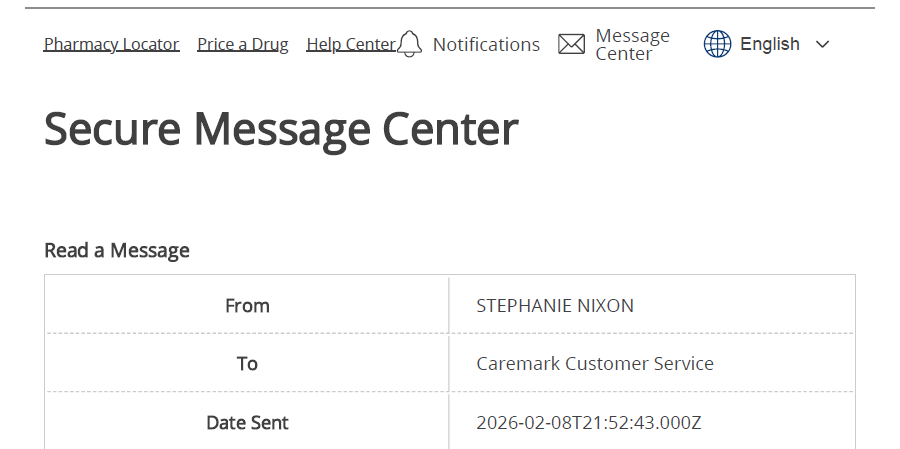
In my Caremark secure message center. There is also one for your health insurance company.

Pro-Tip: Document Like a Clinician

When you are dealing with brain fog or fatigue, relying on memory is risky. I treat every insurance interaction like a patient case note.

  • Log Everything: Date, Time, and the Representative’s Name.
  • Ask for the Reference Number: Every call has a “Case ID.” Ask for it immediately.
  • The “30-Day” Clock: If they say they will “review it,” mark your calendar for exactly 30 days later. If they haven’t fixed it, they may owe you interest.
  • See my post on creating a “patient’s log” that may help you track who said/did what (and when)

The Magic Words to Use

If you do have to speak to someone, use these terms to get past the front-line script:

  • “Plan Design Error”: This tells them the computer is set up wrong for your specific group.
  • “Adjudication Breakdown”: This asks for the math behind the price (e.g., how much was copay vs. deductible).
  • “Accumulator Adjustment”: This asks them to fix your deductible history so future claims process correctly.
  • “Senior team”: If you have already worked with the senior team on your issue, then explain the time it has taken and ask for the appropriate representative

The Takeaway

It took weeks of persistence, but we finally got a break. A representative worked with our local pharmacy on one claim and we were refunded for the discrepancy that was initially erroneously classified “deductible” ($747 of the $807.07 prescription cost). The call was disconnected before he could let me know how he was managing the issue with the Caremark pharmacy payments, but we have the proof we need to win.

I spent years advocating for others. Now, I’m learning that the most important advocacy is often the kind we do for ourselves—quietly, methodically, and with the receipts to prove it.

Disclaimer: I am a Speech-Language Pathologist and educational consultant, not an insurance broker or attorney. This post shares my personal experience and is not intended as legal or financial advice. Always consult your specific plan documents for coverage details.

Access and advocacy chronic illness claims processing clinical documentation bias communication log deductible Department of Education doge Dyslexia education errors processing claims gmail google workspace Guava Health Health apps healthcare communication disparities health insurance health insurance appeals health insurance benefits health insurance mistakes Independent Funding innovation Institute of Education Sciences invisible illness Kanban Task Tracker learning disabilities managing your health max out of pocket medical gaslighting examples medical record transparency more than labs National Institutes of Health neurodivergence NIH Organizer patient advocacy in healthcare Perplexity Health AI petition pharmacy benefit managers Planner Research Funding speech-language pathology Spoonie life subjective vs. objective medical notes Systematic Research
deductible, errors processing claims, health insurance, health insurance mistakes, max out of pocket, pharmacy benefit managers